Agents on other machines, on one canvas
Cuewire 0.1.26 lets one canvas span machines. Attach a Linux machine over SSH, or a WSL distribution, put an agent on it, and it works with the agents on your computer through the same wires, much as if they were all local.
Work that lives on another machine
You may run coding agents on a laptop while the work lives somewhere else: a Linux server with the real data, a GPU box, or a WSL distribution with the toolchain Windows lacks. Until now a Cuewire canvas lived on one machine. To have an agent on your laptop and one on the server work together, you opened two canvases and copied messages between them by hand. Their notes were in two places, and neither agent could see the other's commits.
In 0.1.26 a canvas on your computer can attach other machines. Agents run where you put them, and the wires between them work across machines.
What it looks like
In the sidebar, click Attach a machine and type the machine and its project folder: devbox:/srv/app, me@devbox:2222:/srv/app when SSH listens on another port, or wsl:Ubuntu:/home/me/app for a WSL distribution. Cuewire connects as it does for a remote project. It installs its server there if needed, and asks in a dialog for a password or about a new host key. The machine gets a short name on the canvas, such as devbox or wsl-ubuntu.
New agents still run on your computer. To move one, right-click it, choose Configure…, pick the machine under Run on, and click Save and restart. Its title now reads Builder · on devbox, and its terminal starts in the project folder there. An agent that moves to another machine starts a fresh conversation.
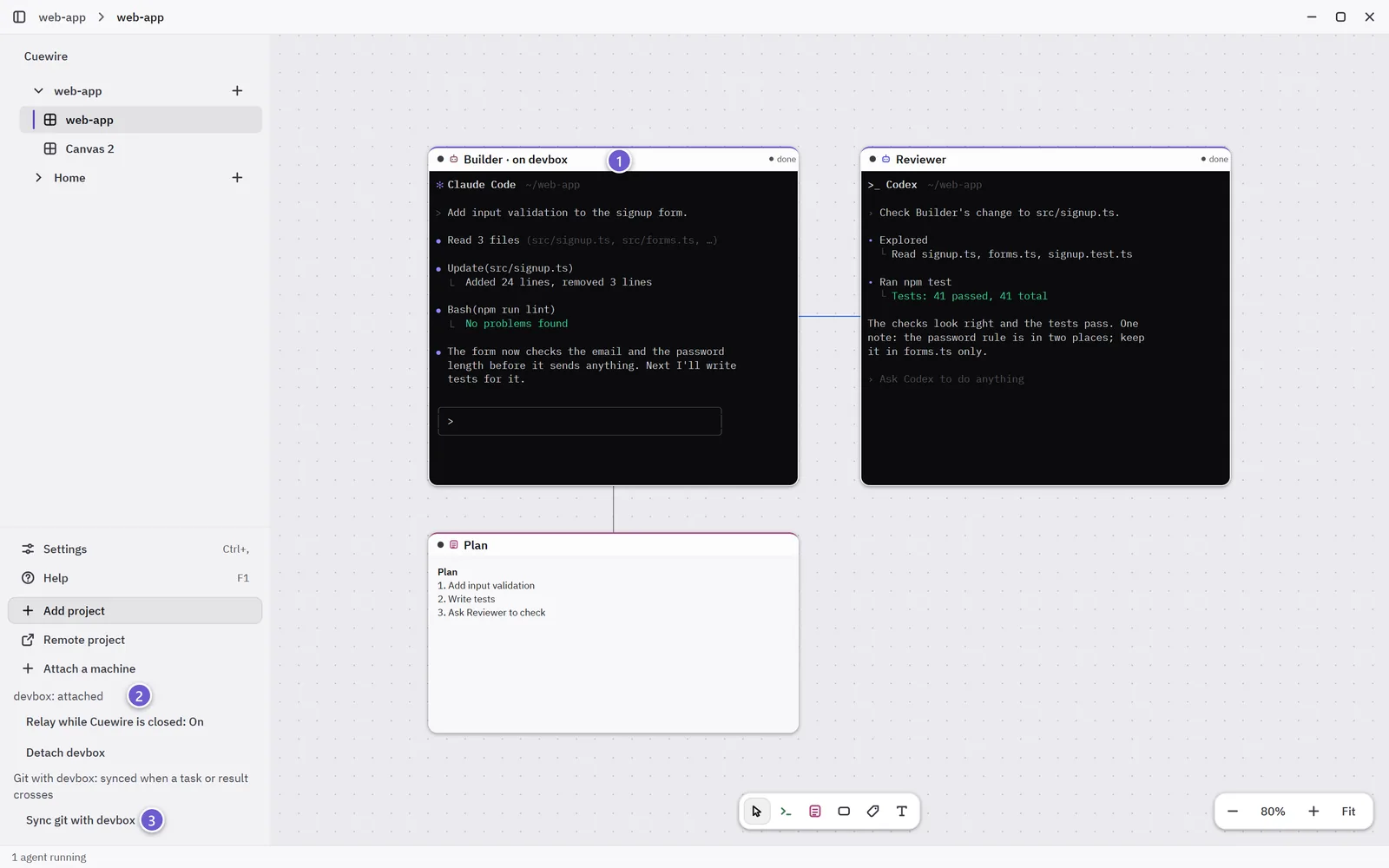
If the connection drops, the machine's sidebar line says so, for example devbox: Reconnecting to devbox · attempt 3, with why the last try failed and a Reconnect now button. Agents there keep running. Tasks for them wait.
The agents have nothing new to learn. cuewire ask, send, result and check work across machines through the same wires. A task says where it came from, for example from Lead (on the home machine), and cuewire list says where each agent is. Notes stay on your computer, the canvas's home machine; agents elsewhere still read and change them with cuewire note.
How a task crosses
Each machine runs its own Cuewire daemon, with its own bridge for the canvas. Your computer has one, and devbox has one. The app pushes the canvas's wiring to each, so each bridge knows which agents are its own and which are on another machine.
When an agent sends a task to an agent on another machine, its bridge creates the task as usual, but doesn't deliver it. It puts it in an outbox, saved to disk. Results, note requests and check requests take the same path. The other machine usually can't reach your computer, so the carrying starts from your side. The app reads every outbox twice a second and hands each item to the daemon it is for, over the connection it already holds to run that machine's terminals: SSH, or wsl.exe for WSL. No new port, no new credentials.
A few rules keep this from losing or doubling work:
- Saved before accepted. The receiving daemon saves an item before it answers that it has it, and types a task into the agent's terminal only after that save. The sending daemon drops the item from its outbox only once it is acknowledged, and saves that too. A crash at any point goes back to the last save.
- Deduplicated. If an answer is lost, the item is carried again. The receiver keeps the ids it has taken in from each machine, so a resend changes nothing. A task is typed into its agent's terminal at most once, and every task ends with one result.
- In order. If a machine can't take an item yet, the later items for that machine wait behind it. Cuewire tries again after 1 second, doubling up to 30.
- The sender comes from the connection. Which machine sent an item is set by the relay, from the daemon it read the item from. It never comes from the item itself.
- Checked against the receiver's own wiring. The receiving bridge checks that the sender is an agent on the sending machine, that the recipient is one of its own, and that the two are wired, by the canvas as it was pushed to it.
- Failures come back. An item that can never fit, say because the wire was removed, goes back to its origin, which fails the task with the reason and tells the sender. So does an item a machine keeps refusing for 10 minutes. A task waiting for an agent that left its machine, detached or moved by Run on, fails at once and says why.
Git follows the work
Two agents on two machines, working in one repository, need to see each other's commits. When you attach a machine, Cuewire checks that both folders hold the same repository: a clone, with the same first commit. Your checkout gets a git remote, cuewire-devbox. Two git commands move the refs, both run from your computer:
- Fetch devbox's branches into
refs/remotes/cuewire-devbox/*on your computer. - Push your current branch into
refs/remotes/cuewire-local/*on devbox.
Neither touches a branch you or an agent works on. Nothing writes refs/heads/* on either side, and nothing merges. Every refspec Cuewire builds must land under refs/remotes/cuewire-*, or git is not run. Only your current branch goes to the machine; your other branches stay on your computer.
Before a task or a result crosses, Cuewire syncs that machine and adds one line to the text the agent receives:
Sender is on devbox, branch feature-x at 3653b8d; here it is cuewire-devbox/feature-x (git log cuewire-devbox/feature-x).
Merging that work stays the agent's job, or yours. A task waits at most 30 seconds for the sync. If the sync is slower or fails, the task still goes, without the line, and the sidebar says why. Agents can also run cuewire sync, and the sidebar has Sync git with devbox.
If the machine's folder holds another repository, or none, the sidebar says Git sync with devbox is off. The agents still message each other.
When Cuewire is closed
The app carries tasks for the canvases you have open in it. Cuewire's background service on your computer carries every other canvas with attached machines, and all of them once you close the app. The app gives the service a plan for each canvas with attached machines: each machine's address, the server path Cuewire recorded there, its state, and the canvas's wiring. The plan holds no secrets. The service still re-checks your licence and policies on every pass.
Only one of them carries a canvas at a time. The app holds a short lease on each canvas it relays, renewed every half second, and the service relays a canvas only while nobody holds it. When you open a canvas in the app, the app takes it back. A canvas you leave stays with the app while its machines stay connected, then goes back to the service. A crashed app's lease runs out after 5 seconds.
The service never trusts a host key on its own: its ssh runs with StrictHostKeyChecking=yes. A machine whose host key it doesn't know waits, and the service tells the agents to open Cuewire and connect once; opening that canvas does it. A changed host key is refused. With the app closed, its ssh also runs with BatchMode=yes, so only keys or an SSH agent sign in, and a machine that signs in only with a password waits for sign-in. While the app is open, the service can ask for that password in the app's dialog, which says it is the service ("This PC's Cuewire service connecting to devbox to relay tasks"), even for a canvas you haven't opened. The answer isn't kept.
The service doesn't sync git. A task or result it carries ends with a line saying so: Git was not synced (Cuewire relayed this while the canvas was closed); run `cuewire sync` once it is open in Cuewire.
Each machine has its own switch, Relay while Cuewire is closed, on by default. Turn it off and tasks for that machine wait until you open that canvas in the app. The switch doesn't affect a canvas open in the app.
Passwords
Keys are the easiest way. If a machine signs in with a password, Cuewire asks in its own dialog, which says why ssh is asking, for example "Git sync: getting devbox's branches (fetch)".
- In memory only. A password you type is kept while the app runs. It is never written to disk or logged.
- Per destination. It is kept for
user@host:port. The same host on another port asks for its own. - Only after it worked. A later ssh to that destination gets it only once an ssh it was given to has signed in with it. A wrong password is asked for again and never passed on.
- Few prompts. With the right password, connecting asks once, and so does a git sync; once the connection has signed in, a sync usually asks nothing. Time spent in the dialog doesn't count against either one's time limit.
- Forgotten on Detach. Attaching the machine again asks again.
- Never kept by the service. Its ssh never gets a remembered password, and nothing it is told is kept.
Limits
- Pro. Attaching a machine needs Pro, Team or Enterprise. If a plan lapses, the machine's agents keep running there, but their tasks wait.
- Linux on the other side. The attached machine runs Linux, over SSH or WSL, with the agents you want installed on it. A remote project can't have machines attached; a canvas on your computer can.
- No layers. Layers are off on a canvas with attached machines.
- One branch goes over. Only the branch checked out on your computer is mirrored to the machine. Branches you pushed earlier stay there under
cuewire-local/. - No git for a canvas the service carries. Tasks still cross through the service, but git waits until the canvas is open in Cuewire, or for
cuewire sync. - Cancelling stops only your side. Once the other machine has a task, cancelling it doesn't stop it there. The agent may still finish it.
- SSH clients. On Linux and macOS, if you start Cuewire from a terminal, password prompts need OpenSSH 8.4 or later; or use a key. On Windows, Cuewire works best with Windows' own OpenSSH: an MSYS or Cygwin ssh set up with
ControlPersistloses its shared connection whenever Cuewire ends one.
Try it
Get 0.1.26 from the download page, or let Cuewire update itself. You need a canvas on your computer, a Linux machine you reach over SSH or a WSL distribution, a clone of the same repository there if you want git sync, and your agents installed on that machine. The manual page, Agents on other machines, walks through attaching, Run on, git sync and detaching.