Cuewire vs Friday Work
Free and automatic, or approval-first. Who should pick which.
Last checked: 25 November 2026 (Friday facts re-verified live on its own site, 25 Nov 2026)
Friday is the free, MIT-licensed desktop app where Claude Code, Codex, Cursor and 14 more work as one team: a shared task board, agents that message each other, and a task you gave an agent that moves on to another one when it runs out of usage. If you want your agents to keep going without you, and you want it free and open source, Friday is the right pick: download it today, no account.
Cuewire is for the other half of the same problem: several agents running at once, and you staying in charge of what they do. Same agents, same computer, real terminals on one canvas, with an approval list, a sandbox per task, and a review before anything merges.
What Friday Work does
Friday runs the coding tools you already pay for, on your own computer, with no account. One agent can lead: it splits a job into tasks on a board, free agents take them, and a task isn't done until it is checked. Agents ask each other questions and you see every message. When a tool runs out of usage partway through a task you gave it, the task goes to the agent best placed to finish it, with a record of what was done. Version 0.4 adds Friday IDE, VS Code with your agents beside your code, and its Crew gives you teammates for research, writing and planning as well as code.
From tryfridaywork.com, its Orchestrator and usage-limit hand-off pages, and its changelog (v0.4.2, 24 November 2026). Friday's own screenshots are on its site.
Where each one wins
Where Cuewire wins
- Approvals, wherever you are. Agents that wait line up in one Needs you list with the question they asked. Approve with Ctrl+Shift+Y, deny with Ctrl+Shift+N, or approve and deny from your phone with the paired, end-to-end encrypted companion.
- A review before you merge. When a task's worktree is done, Cuewire ranks its changes by risk, warns when two tasks touch the same lines, and a read-only reviewer agent writes its findings down.
- A sandbox per task. With Docker and an image you build with your agents in it, an agent runs in a container that sees only its task's worktree, so "skip permission prompts" can't touch the rest of your computer.
- Windows-first. Built on Windows 10 and 11, with WSL projects. Since 0.1.26 one canvas can also hold agents on other machines, over SSH or in WSL (Pro).
Where Friday Work wins
- Price. The whole app is free. Cuewire is free for up to 3 agents at once; its reviews, phone companion, limits scheduler and agents on other machines are in Pro.
- Open source. MIT-licensed: read every line, fork it, ship your own build.
- Hand-off at a usage limit. Friday moves a task you gave an agent to another agent when that one runs out, and Crew teammates have fallbacks in order. Cuewire waits for the limit to clear, or moves the agent to its next key.
- More tools. 17 named coding tools plus any ACP agent, your own API keys and local models, and a built-in IDE. Its Mac app is signed and notarized.
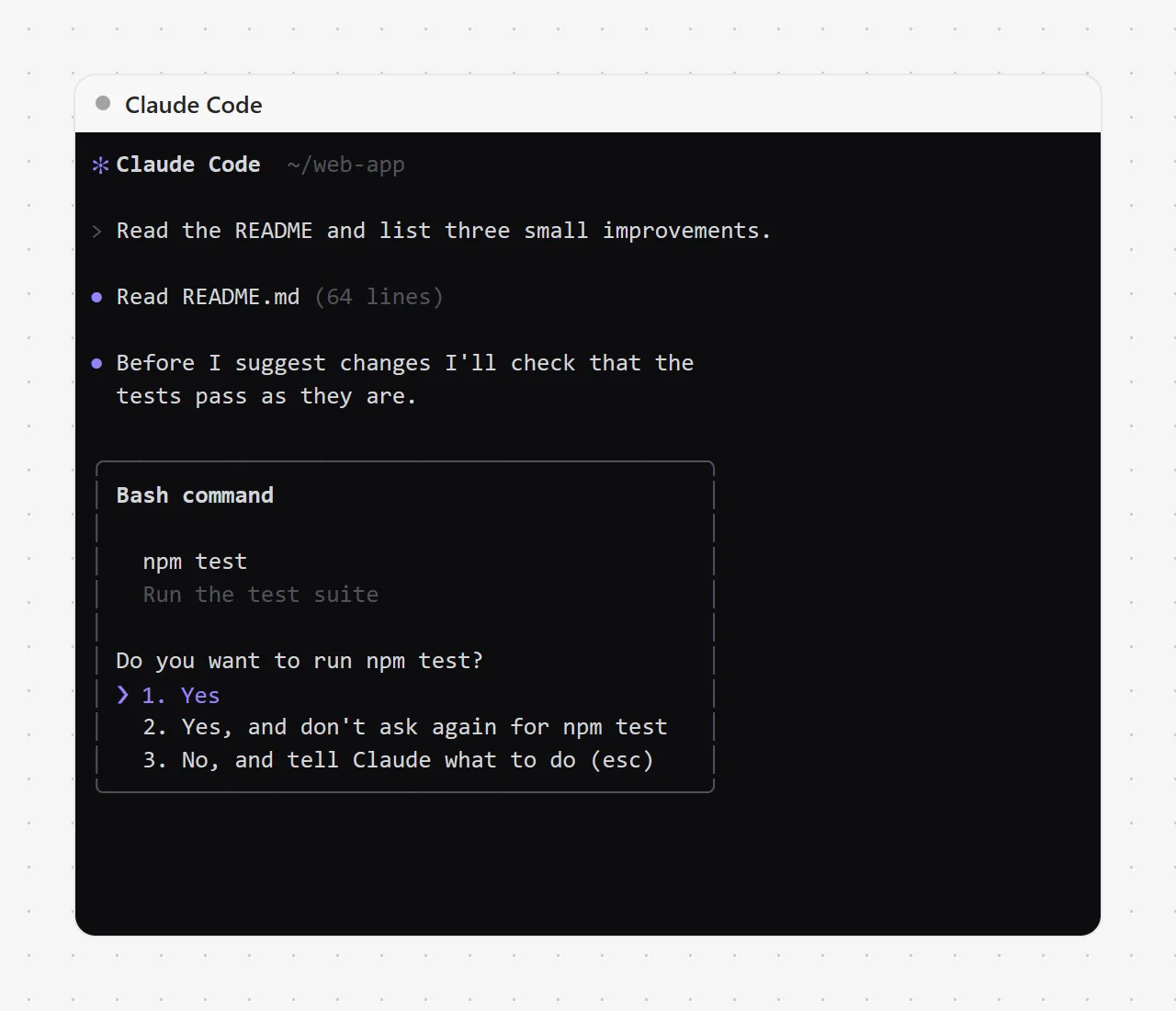
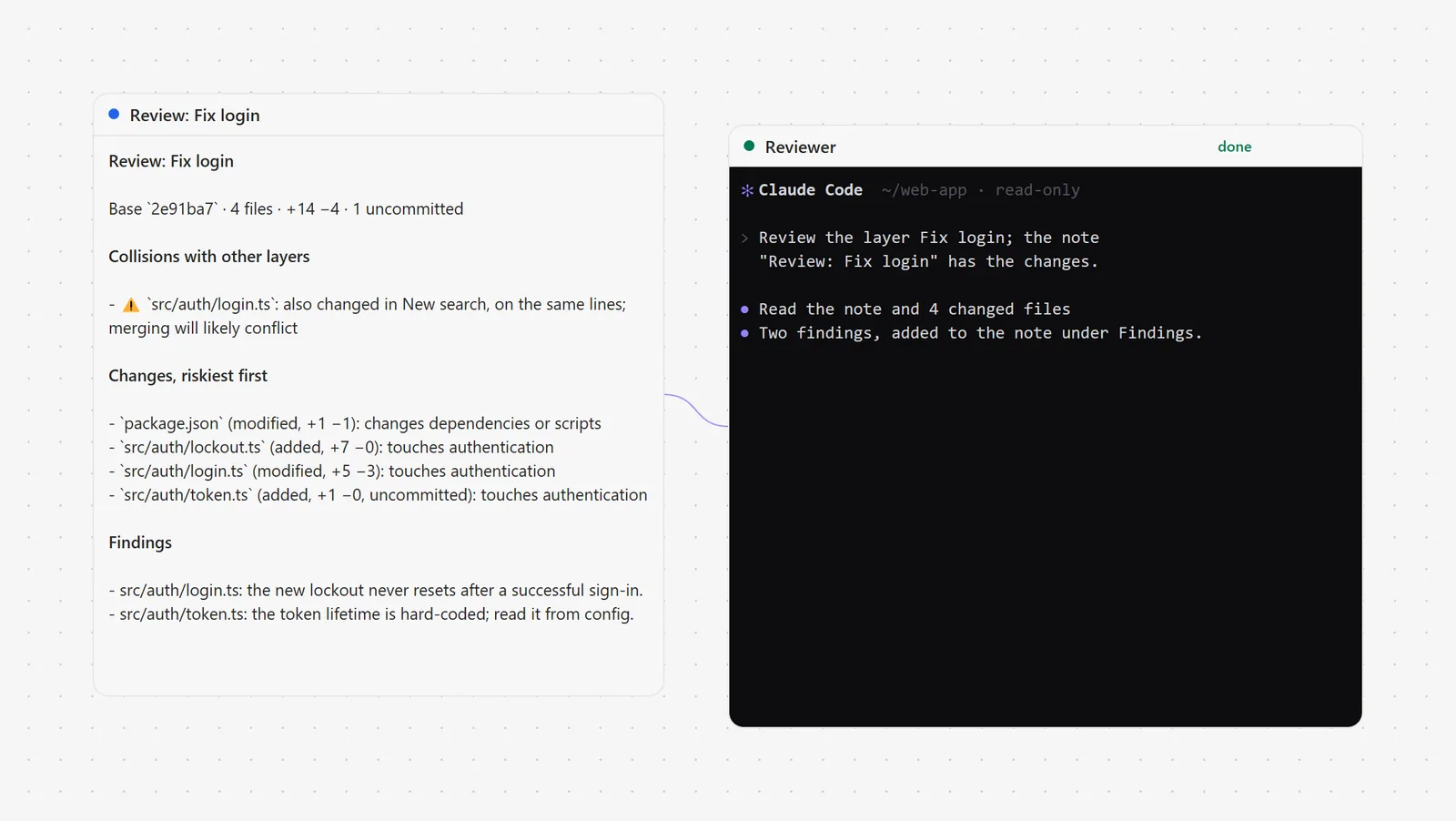
Cuewire and Friday Work, side by side
| Compared | Cuewire | Friday (from its own site, checked 25 Nov 2026) |
|---|---|---|
| What it is | A desktop app that puts your coding agents on one canvas, each in a real terminal, and keeps you in control of them | A free, open-source desktop app where coding agents work as one team on a shared task board; since 0.4 it also has an IDE (VS Code built in) and Crew teammates |
| Which agents | Claude Code, Codex, Copilot CLI, Gemini CLI, Antigravity, OpenCode, Grok, any shell command | Claude Code, Codex, Cursor, GitHub Copilot, Antigravity CLI, OpenCode, Devin, Junie, Kiro, Factory Droid, Grok Build, Cline, Kilo, Amp, Muse Code, Qwen Code and Pi, plus any ACP agent; also your own API keys and local models |
| When an agent hits its limit | Shows tokens, costs and how close each account is to its limits; tasks wait when an account nears its limit and go out when it clears, or the agent moves to its next key (key pools); you choose which account or key each agent uses | Shows each tool's remaining usage. A task you gave an agent goes to the agent best placed to finish it, with a record of what it did and changed, and that agent is told to check the code and run the tests first; work from a board task or another agent doesn't hand off. If nobody can take it, the same agent carries on when the limit lifts if its reset time is known; otherwise a person picks what happens next |
| Approval | “Needs you” list; approve Ctrl+Shift+Y, deny Ctrl+Shift+N; desktop notifications, and approve or deny on your phone (end-to-end encrypted companion) | Needs you, since v0.2.11 (4 Nov 2026): one page of everything waiting on you, worst first, with a suggested answer; desktop notifications. Its phone app is listed as coming soon |
| Safety | Docker sandbox per layer; agents run in a background service and survive closing the app; Cuewire never sends your code, prompts or notes anywhere | Runs on your computer, listening on 127.0.0.1 only; no account. Agents work in Plan, Manual, Auto or Full access mode; Auto still stops for pull requests, pushes to main, deploys, money, posting as you, access and data loss |
| Review before merge | Git worktree and canvas per task (a layer); changes ranked by risk; a warning when two layers touch the same lines; a read-only reviewer agent writes findings | An agent can have its own worktree and branch, and in Crew rooms each task gets its own branch; a finished task is checked by its own check or the project's typecheck, then by another agent; a self-review before the pull request; notes on diff lines for the agent, stage by hunk; Friday never merges |
| Platforms | Windows 10 and 11, macOS 13 or newer, and 64-bit Linux, all direct downloads from /download; with Pro, agents can also run on SSH hosts or in WSL on the same canvas (how) | macOS, Windows and Linux (AppImage), or Homebrew and npx; a session can run on another of your computers |
| Price and access | Free for up to 3 agents at once, no account. Pro $16 a month or $144 a year, free for 14 days with no card; Team $40 per person a month (pricing). Reviews, the phone companion, the limits scheduler and agents on other machines are in Pro. Version 0.1.26 downloads directly for all three platforms; the macOS build is not notarized yet, so the download page has the first-open steps | Free, MIT, no account; downloadable today. The Mac app is signed and notarized; the Windows installer is not signed yet. Friday Team (hosted, several people in one session): talk to us |
| Teams | Team plan: single sign-on and directory sync, policies for agents, models, sandboxes, hosts and telemetry, shared roles, exportable audit log | Friday Team, the hosted version: steer one agent together, review each other's changes; not open source |
Who should pick which
Pick Friday
If you want free and open source, downloadable now, and a task you hand an agent to carry on with another tool the moment that one hits its limit.
Pick Cuewire
If the risk you care about is an agent doing something you didn't approve: you want the approval in your pocket, a sandbox around each task, and a risk-ranked review before anything merges. All three platforms download directly.
See Cuewire in real use
Four agents building Cuewire itself, with voiceover and subtitles (1 min 51 s).
Pressing play loads the video from YouTube (youtube-nocookie.com). Or watch it on YouTube.
What is Cuewire?
Cuewire puts Claude Code, Codex, Copilot CLI, Gemini CLI and more on one canvas, in real terminals. It tells you which agent needs you, lets agents hand work to each other through wires, and checks their changes before you merge. Free for up to 3 agents at once, no account needed.
Questions
Is Cuewire free?
Free for up to 3 agents at once, no account. Pro is free for 14 days when you sign in, with no card. Reviews, the phone companion, the scheduler that waits out limits and agents on other machines are part of Pro.
Does Cuewire hand a task to another agent when one hits its limit?
Not automatically today. It shows tokens, costs and how close each agent is to its limit, and its scheduler holds tasks until the limit clears or, with a key pool, moves the agent to its next key.
Can I approve agents from my phone?
Yes. The paired companion notifies you and lets you approve, deny and send prompts, end-to-end encrypted.
Does Cuewire send my code anywhere?
No. Cuewire never sends your code, prompts or notes anywhere, and never touches your agents' logins: your agents talk to their own providers with your own logins. The one exception is the phone companion, if you pair one: messages between your phone and your desktop pass through Cuewire's relay, end-to-end encrypted, and the relay keeps nothing. The app may also send a crash heartbeat, on unless you turn it off, and usage counts, off unless you turn them on. Neither ever carries names, paths or text.